For feng shui office lighting, start with a space you can actually use: readable papers, a clear screen and light sources that stay out of your eyes. Adjust the window covering and lamp position before buying more fixtures. A brighter room is not automatically a more comfortable workstation.
This guide takes a practical, feng shui-inspired approach to arranging the work area. It separates cultural interpretation from lighting ergonomics: neither a compass direction nor a decorative lamp establishes a career outcome. The changes below can be checked from the seated position in your own room, with the tasks you really perform. Compare conditions in daylight and after dark, because a placement that works at noon can create reflections under evening lights.
Keep cultural context and lighting evidence distinct
The Hearst Museum’s account of a luopan describes feng shui as a practice concerned with arranging space in relation to its surroundings, alongside divinatory traditions. That is cultural context, not a lighting standard or clinical evidence for a particular lamp placement.
Here, the practical goal is explicit: see the work without a distracting bright source or reflection. A preferred material, shape or decorative style can sit within that plan, provided it does not obstruct the light, controls or passage around the desk. These suggestions are an applied room review, not a complete classical feng shui assessment.
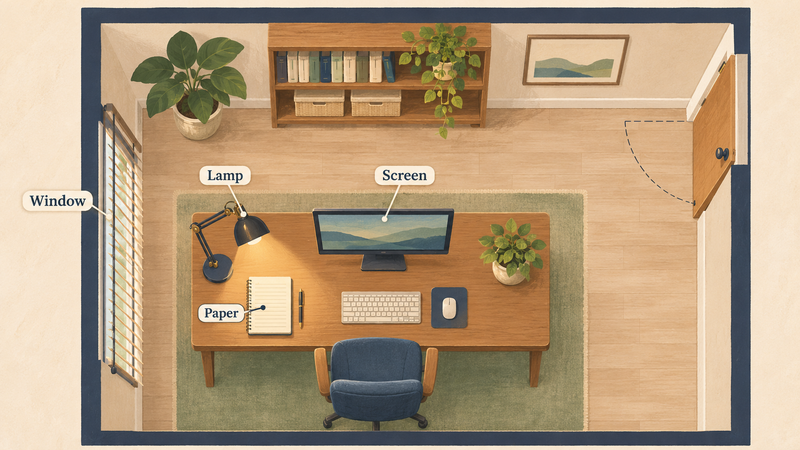
Step 1: identify the actual light problem
Sit normally and open a document you commonly read. Then look at a paper page on the desk. Is either difficult to read? Do you see a reflected window, exposed bulb or bright patch? Does your hand cast a shadow over the writing? Record the particular problem before changing the whole room.
The Canadian Centre for Occupational Health and Safety lighting checklist checks sufficient task light, troublesome reflections, shadows and steady illumination. Use those observable conditions as your starting questions. A decorative description such as “balanced light” is less useful unless you can say what changed at the work surface.
Step 2: control window light and reflections
OSHA’s workstation guidance recommends arranging the screen at right angles to windows and using blinds or shades to manage bright light. Think of the window as being to the side of the screen, rather than directly behind the screen or behind your chair. This is a starting geometry, not a guarantee that every reflection disappears.
Try the blind angle before moving furniture. If the desk can move, change its orientation while keeping access and an ordinary working posture. Recheck the screen from your normal viewing position. A photographic view taken from the doorway can miss reflections seen only where your eyes are. Avoid replacing a comfortable setup with a difficult one merely to maintain a preferred symbolic direction.
| What you notice | First change to try | How to review it |
|---|---|---|
| Window reflected on screen | Adjust the blind; turn the screen relative to the window | Read the same screen from the seated position. |
| Paper dark while screen is readable | Add or aim a shaded task lamp at the paper | Check writing shadows and screen reflection together. |
| Exposed bulb in view | Reposition or shield that source | Check the normal line of sight. |
| Uneven evening light | Review ambient and task light together | Compare the page, screen and surrounding area. |
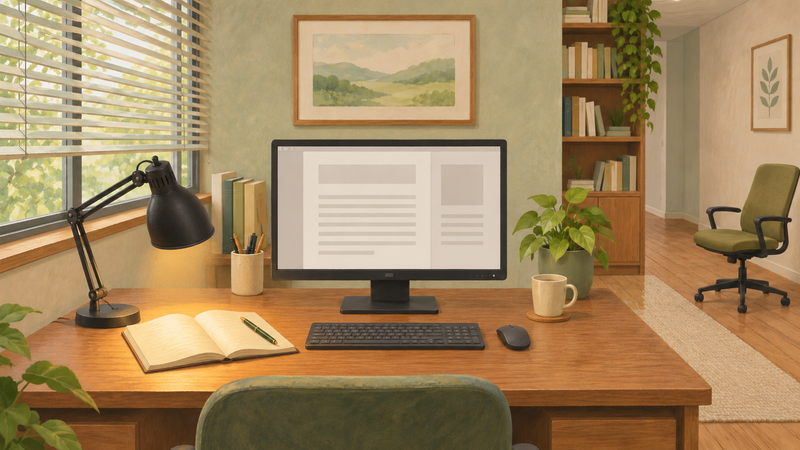
Step 3: light the document, not the screen
CCOHS explains the paper-and-monitor problem: the screen emits light, while paper needs illumination from the room or a task source. A desk lamp can illuminate the page without adding excessive brightness around the monitor.
Move an adjustable shaded lamp until the page is readable and the bulb stays out of view. Write a few lines, then adjust for the shadow of your hand. The useful side depends on the person and task; “always put it on the left” is an incomplete rule for a left-handed writer. Finally, return to the screen and check that the lamp has not introduced a new reflection.
Step 4: review the whole work area
Do not evaluate a lamp by its isolated pool of light. Look between the screen, page and surroundings. The CCOHS checklist also considers uncomfortable light–dark transitions, matte finishes and appropriate monitor controls. Use the controls and available shades to make those transitions manageable.
Keep the base stable and cords clear of circulation space. Changing the workplace’s fixed lighting or electrical installation belongs with the responsible facilities team. If lights visibly flicker, report the condition rather than treating it as a symbolic sign. Persistent eye discomfort can have several causes; the CCOHS guidance advises an eye examination rather than assuming a lamp or feng shui correction will resolve it.

Try one reversible evening adjustment
Consider an invented example: a worker can read the monitor comfortably but has to lean toward a dim paper notebook. Instead of adding a brighter overhead bulb, they aim an existing shaded desk lamp at the notebook, check hand shadows and then check the monitor for reflections. The change is retained only if both tasks remain readable from the normal posture.
You can make the same kind of comparison without calling it proof of improved productivity or luck. Record the task and time of day, change one setting and repeat the task. For the surrounding layout, see desk placement in a shared office. For space occupied by greenery, compare the office plant guide before putting a plant between a lamp and its task.
Sources checked November 13, 2026: Hearst Museum for cultural context; OSHA and CCOHS for the practical lighting checks. Layouts and the worker example are original illustrations, not client cases or measured outcome studies.